
What are remote desktop and RDP?
Remote desktop lets you see and control another computer's screen from somewhere else. RDP, the Remote Desktop Protocol, is the version built into Windows, and it is how most offices reach a work PC or a Windows server from outside.
Talk to an engineer Knowledge base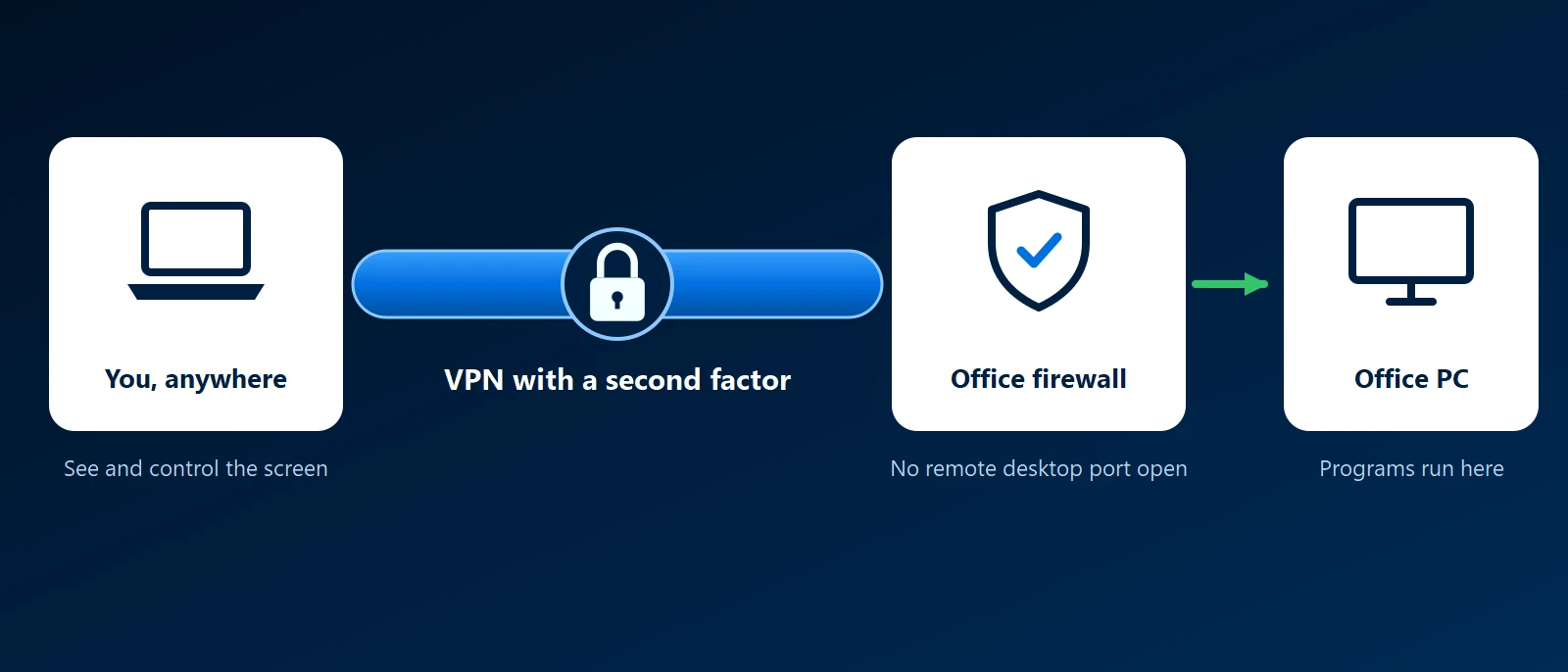
What it is
With remote desktop, the programs run on the far computer. Only the picture comes to you, and your keyboard and mouse go back. Files stay where they are, which is why it suits accounting systems and other software that has to run on one particular machine.
RDP is Microsoft's protocol for this. The computer being controlled needs Windows Pro or Windows Server, because Windows Home cannot accept incoming connections. Our Windows licensing guide covers the difference. The built-in Remote Desktop Connection app, or the newer Windows App, connects to it. It listens on port 3389 by default.
What businesses use it for
- Working from home on the office PC: staff open their own desktop, with their programs and files as they left them.
- One shared application: several people sign in to a Windows server that runs the line-of-business software. This needs Remote Desktop Services licenses as well as the server license.
- Server administration: Windows servers are managed over RDP the way Linux servers are managed over SSH.
- Support: a technician sees what the user sees and fixes it without a visit. Support tools use their own remote control software for this, not RDP.
The one rule: never expose it to the internet
An RDP port open to the internet is one of the most common ways ransomware gets in. Automated scanners find it within hours and try stolen and guessed passwords without stopping. Changing the port number does not help.
- Put it behind a VPN: staff connect to the office with a VPN such as WireGuard or Tailscale first, and RDP is only reachable from inside.
- Or use a gateway: Remote Desktop Gateway and similar products accept the connection over HTTPS and check who is asking before passing it on.
- Require a second factor: multi-factor sign-in on the VPN or gateway means a stolen password is not enough.
- Keep Windows patched: remote desktop flaws are fixed in the monthly updates.
- Limit who may connect: only named users, never a shared administrator account.
Other kinds of remote desktop
- VNC: an older, simpler protocol common on Linux and for embedded equipment. It needs the same protection as RDP.
- Remote support tools: software an IT provider installs so a technician can connect to a PC on request.
- Cloud desktops: services such as Azure Virtual Desktop and Windows 365 run the desktop in Microsoft's cloud and stream it to any device.
How KawaConnect works with remote desktop
We set up remote access so that staff reach office computers and servers through a VPN with multi-factor sign-in, and we close remote desktop ports that are open to the internet when we take over a network. That is part of our network security work. Our helpdesk uses remote support tools to fix problems on managed PCs, described under managed IT.
Related services
Network security
VPN access with multi-factor sign-in, and no open management ports.
Managed IT
Helpdesk with remote support for your staff.
Endpoint security
Patched, encrypted and monitored PCs.
Learn more
- Remote Desktop Protocol on WikipediaA neutral overview of RDP, its versions and its security history.
- How to use Remote DesktopMicrosoft's steps for turning it on and connecting, for people setting up one PC.
- Remote Desktop Services overviewMicrosoft's documentation for shared session hosts and the gateway.
- CISA: StopRansomware guideUS government guidance that covers securing remote desktop among other entry points.
Is your remote desktop open to the internet
Tell us how your staff connect from outside the office. We will check what is exposed and how to close it without stopping anyone working.
Start a conversation